Configuring qb-burglary (config.lua)
Open the main config file (config.lua) and make sure the required resource names are the same as the resources on your server
-- If you have renamed your QBCore object replace "QBCore" with the name of your core
Config.CoreObjectName = "QBCore"

-- exports[Config.CoreResourceName]:GetCoreObject()
Config.CoreResourceName = "qb-core"

-- exports[TargetResourceName]:AddZone
Config.TargetResourceName = "qb-target"

-- exports[Config.MenuResourceName]:openMenu
Config.MenuResourceName = "qb-menu"

-- TriggerEvent(Config.LockpickResourceName..':client:openLockpick')
Config.LockpickResourceName = "qb-lockpick"
If you have not renamed your server resources, you do not need to change the resource names shown in the code block above.
Changing the minigame
You can change the minigame for breaking in, disabling the security and cracking safes in the main config
-- Set the skill check minigame for lockpicking a door
Config.DoorSkillcheck = "lockpick"

-- Set the skill check minigame for disabling the security
Config.SecuritySkillcheck = "square"

-- Set the skill check minigame for cracking the safe
Config.SafeSkillcheck = "square"
Minigames for Config.DoorSkillcheck
- “circle” - qb-lock
- “ps-circle” - ps-ui
- “square” - qb-skillbar
- “lockpick” - qb-lockpick
Minigames for Config.SecuritySkillcheck
- “circle” - qb-lock
- “ps-circle” - ps-ui
- “ps-scrambler” - ps-ui
- “square” - qb-skillbar
Minigames for Config.SafeSkillcheck
- “circle” - qb-lock
- “ps-circle” - ps-ui
- “square” - qb-skillbar
Adding a minigame
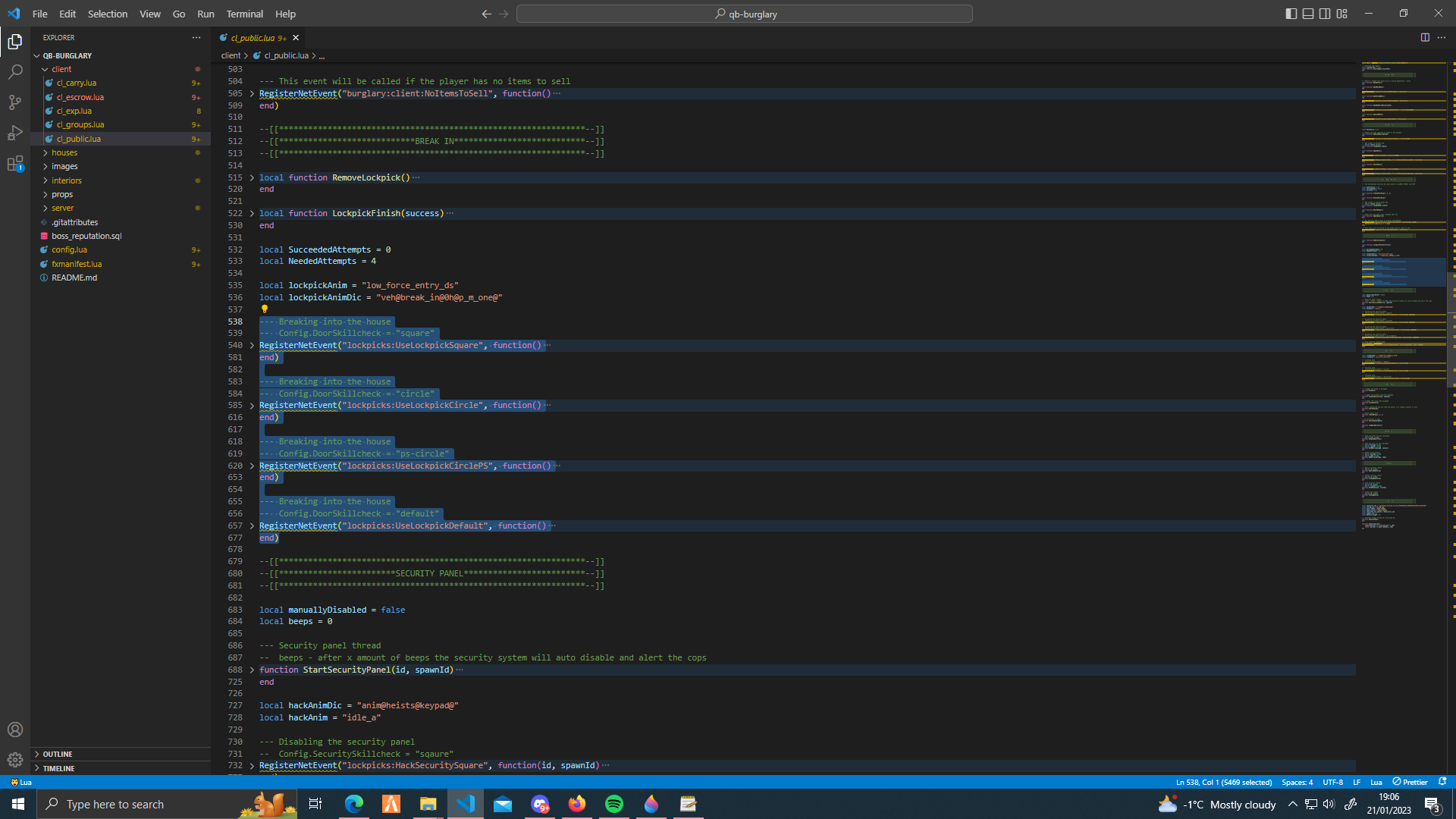
The events for these minigames can be found cl_public.lua. You can modify these events or add a new event for your own minigame.
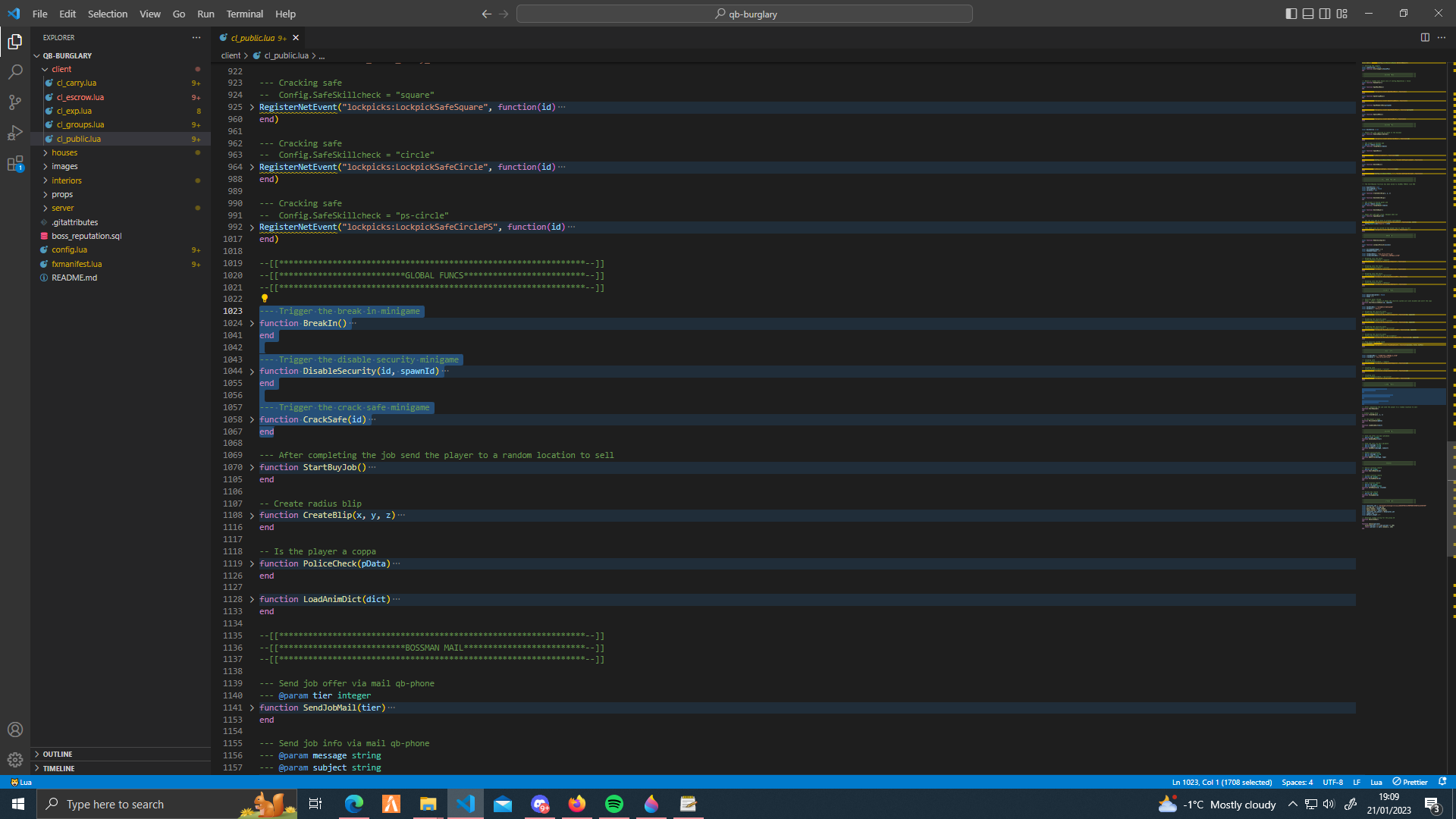
The minigame events shown above are handled by these functions, also in cl_public.lua.
Breaking in time
You can change the time period for robbing houses in the main config. You will not be able to start the break in minigame if it is too early.
-- Example: if the time is 5AM or later you cannot break in
Config.MinTime = 5

-- Example: if the time is 11PM or later you can break in
Config.MaxTime = 23
You can completely remove the time check from the minigame events in cl_public.lua. Look for the events shown in the adding a minigame section above.
-- Remove this to remove the time check
local hours = GetClockHours()
if hours >= Config.MinTime and hours < Config.MaxTime then
    QbNotify(Config.Prompts["time"], "error")
    return
end
Queue and finish time
You can set how long it takes to receive a job offer (seconds) in the main config
-- Set how long it takes for the player to receive a job (seconds)
Config.JobWaitTime = { 285, 345 } -- [1] = min seconds, [2] = max seconds
You can set how long the player has to complete the job (seconds)
-- Set how long the player has to complete the job after entry (seconds)
Config.JobTime = { 325, 385 } -- [1] = min seconds, [2] = max seconds
If you leave the house after it has expired the job will end
Using phone mail
If enabled you will receive job offers and information via the phone mail app.
-- If true the player will be emailed a job offer using qb-phone, the offer must be accepted
-- If false the player will be notified via QB.Notify or the notify resource you are using
Config.QbPhoneMail = true
You can change the phone events used for sending mail in cl_public.lua.
--- Send job offer via mail qb-phone
--- @param tier integer
function SendJobMail(tier)
    TriggerServerEvent("qb-phone:server:sendNewMail", {
        sender = "Bossman",
        subject = "T"..tier.." ".."job offer",
        message = Config.Prompts["requested3"],
        button =
        {
            enabled = true,
            buttonEvent = "burglary:client:AcceptHouse",
            buttonData = tier
        }
    })
end

--- Send job info via mail qb-phone
--- @param message string
--- @param subject string
function SendMail(message, subject)
    TriggerServerEvent("qb-phone:server:sendNewMail", {
        sender = "Bossman",
        subject = subject,
        message = message,
        button = {}
    })
end
Using a different notify
You can disable the QB notifications in the main config
-- If true QB.Notify notifications will be used
-- If false a different notify resource can be used, you can add your own notify trigger in cl_public.lua
Config.QbNotify = false
Go to cl_public.lua and find the QbNotify function
--- Handle notifications
--- @param message string
--- @param type string
function QbNotify(message, type)
    if Config.QbNotify then
        Core.Functions.Notify(message, type)
    else
        --- Add your own notify trigger here, you must set Config.QbNotify = false in config.lua
        --- Example: using okokNotify

        --local time = GetClockHours()
        --exports['okokNotify']:Alert("Bossman", message, time, type)
    end
end
Add your own notify trigger/export to the else statement
Adding or changing dispatch alerts
You can change the dispatch event or edit the alert function in cl_public.lua
local copsAlerted = false
local function AlertCoppers(housePos)
    if not copsAlerted then
        local street1, street2 = GetStreetNameAtCoord(housePos.x, housePos.y, housePos.z, Citizen.ResultAsInteger(), Citizen.ResultAsInteger())
        local street1name = GetStreetNameFromHashKey(street1)
        local street2name = GetStreetNameFromHashKey(street2)
        local gender = Core.Functions.GetPlayerData().charinfo.gender == 1 and "Female" or "Male"

        --- You must use housePos instead of player coords

        ------- You can remove this export and add your own dispatch export/event -------
        --[[exports["ps-dispatch"]:CustomAlert({
            coords = housePos,
            message = "Possible B&E in progress",
            dispatchCode = "10-90",
            description = "Possible B&E in progress, "..gender.." ".."suspect",
            radius = 0,
            sprite = 40,
            color = 2,
            scale = 1.0,
            length = 3,
        })]]--
        ------- You can remove this export and add your own dispatch export/event -------

        copsAlerted = true
    end
end
If dispatch blips are broken when using ps-dispatch you will have to make some quick changes
In ps-dispatch -> cl_events.lua look for the local function HouseRobbery()
local function HouseRobbery()
    local currentPos = GetEntityCoords(PlayerPedId())
    local locationInfo = getStreetandZone(currentPos)
    local gender = GetPedGender()
    TriggerServerEvent("dispatch:server:notify", {
        dispatchcodename = "houserobbery", -- has to match the codes in sv_dispatchcodes.lua so that it generates the right blip
        dispatchCode = "10-90",
        firstStreet = locationInfo,
        gender = gender,
        model = nil,
        plate = nil,
        priority = 2, -- priority
        firstColor = nil,
        automaticGunfire = false,
        origin = {
            x = currentPos.x,
            y = currentPos.y,
            z = currentPos.z
        },
        dispatchMessage = _U('houserobbery'), -- message
        job = { "police" } -- jobs that will get the alerts
    })
end
Replace the HouseRobbery function shown above with this function
local function HouseRobbery(housePos)
    local currentPos = housePos
    local locationInfo = getStreetandZone(currentPos)
    local gender = GetPedGender()
    TriggerServerEvent("dispatch:server:notify", {
        dispatchcodename = "houserobbery", -- has to match the codes in sv_dispatchcodes.lua so that it generates the right blip
        dispatchCode = "10-90",
        firstStreet = locationInfo,
        gender = gender,
        model = nil,
        plate = nil,
        priority = 2, -- priority
        firstColor = nil,
        automaticGunfire = false,
        origin = {
            x = currentPos.x,
            y = currentPos.y,
            z = currentPos.z
        },
        dispatchMessage = _U('houserobbery'), -- message
        job = { "police" } -- jobs that will get the alerts
    })
end
Once you have done that you want to go back to the AlertCoppers function in cl_public.lua and replace it with this function
--- Alerting the coppers
local copsAlerted = false
local function AlertCoppers(housePos)
    if not copsAlerted then
        ------- You can remove this export and add your own dispatch export/event -------
        exports['ps-dispatch']:HouseRobbery(housePos)
        ------- You can remove this export and add your own dispatch export/event -------
        copsAlerted = true
    end
end
If blips are also broken when shooting/fighting you will have to make a few more changes
In ps-dispatch -> cl_events.lua look for local function Shooting()
local function Shooting()
    local currentPos = GetEntityCoords(PlayerPedId())
    local locationInfo = getStreetandZone(currentPos)
    local gender = GetPedGender()
    local PlayerPed = PlayerPedId()
    local CurrentWeapon = GetSelectedPedWeapon(PlayerPed)
    local speed = math.floor(GetEntitySpeed(vehicle) * 2.236936) .. " MPH" -- * 3.6 = KMH    /    * 2.236936 = MPH
    local weapon = WeaponTable[CurrentWeapon] or "UNKNOWN"

    TriggerServerEvent("dispatch:server:notify", {
        dispatchcodename = "shooting", -- has to match the codes in sv_dispatchcodes.lua so that it generates the right blip
        dispatchCode = "10-11",
        firstStreet = locationInfo,
        gender = gender,
        weapon = weapon,
        model = nil,
        plate = nil,
        priority = 2,
        firstColor = nil,
        automaticGunfire = false,
        origin = {
            x = currentPos.x,
            y = currentPos.y,
            z = currentPos.z
        },
        dispatchMessage = _U('shooting'),
        job = { "police" }
    })

end
Replace the Shooting function shown above with this function
local function Shooting(housePos)
    local currentPos = housePos or GetEntityCoords(PlayerPedId())
    local locationInfo = getStreetandZone(currentPos)
    local gender = GetPedGender()
    local PlayerPed = PlayerPedId()
    local CurrentWeapon = GetSelectedPedWeapon(PlayerPed)
    local speed = math.floor(GetEntitySpeed(vehicle) * 2.236936) .. " MPH" -- * 3.6 = KMH    /    * 2.236936 = MPH
    local weapon = WeaponTable[CurrentWeapon] or "UNKNOWN"

    TriggerServerEvent("dispatch:server:notify", {
        dispatchcodename = "shooting", -- has to match the codes in sv_dispatchcodes.lua so that it generates the right blip
        dispatchCode = "10-11",
        firstStreet = locationInfo,
        gender = gender,
        weapon = weapon,
        model = nil,
        plate = nil,
        priority = 2,
        firstColor = nil,
        automaticGunfire = false,
        origin = {
            x = currentPos.x,
            y = currentPos.y,
            z = currentPos.z
        },
        dispatchMessage = _U('shooting'),
        job = { "police" }
    })
end
In ps-dispatch -> cl_loops.lua look for exports['ps-dispatch']:Shooting() around line 43
Replace the Shooting() line with this block
local house = exports['qb-burglary']:GetTier()
local pos
if house then
    local currentId = exports['qb-burglary']:GetCurrentHouse()
    pos = house[currentId]['location']
end
exports['ps-dispatch']:Shooting(pos or nil)
Do the same again for fighting, in ps-dispatch -> cl_loops.lua look for exports['ps-dispatch']:Fight() around line 50
Replace the Fight() line with this block
local house = exports['qb-burglary']:GetTier()
local pos
if house then
    local currentId = exports['qb-burglary']:GetCurrentHouse()
    pos = house[currentId]['location']
end
exports['ps-dispatch']:Fight(pos or nil)
In ps-dispatch -> cl_events.lua look for local function Fight()
Replace the Fight() function with this function
local function Fight(housePos)
    local currentPos = housePos or GetEntityCoords(PlayerPedId())
    local locationInfo = getStreetandZone(currentPos)
    local gender = GetPedGender()
    TriggerServerEvent("dispatch:server:notify", {
        dispatchcodename = "fight", -- has to match the codes in sv_dispatchcodes.lua so that it generates the right blip
        dispatchCode = "10-10",
        firstStreet = locationInfo,
        gender = gender,
        model = nil,
        plate = nil,
        priority = 2,
        firstColor = nil,
        automaticGunfire = false,
        origin = {
            x = currentPos.x,
            y = currentPos.y,
            z = currentPos.z
        },
        dispatchMessage = _U('melee'),
        job = { "police" }
    })
end